Lexfolio, a guide
How to read two books side by side on iPad
An iPad screen is wide enough for two books, and there are good reasons to want both open: a novel and its translation, a textbook and the solutions PDF, a paper and the paper it cites. There are two ways to do it. You can put two reading apps next to each other with iPadOS multitasking, or you can open both books inside one reader that has two panes. The first costs nothing extra; the second keeps the two books working together.
Two apps next to each other
iPadOS can show two app windows side by side, for example a PDF in Files on the left and an EPUB in a reading app on the right. This works with any pair of apps that support multitasking, and it is the quickest way to try the idea.
The two windows know nothing about each other, though. Each one scrolls, searches and keeps notes on its own, so you scroll twice, search twice, and your highlights end up in two apps. Opening two books in the same app this way only works if that app supports more than one window.
For a quick comparison of two pages, that is enough. For reading a whole book against another, a reader built for two books is less work.
One reader with two panes
Lexfolio, our EPUB and PDF reader for iPad, iPhone and Mac, opens two books in one workspace. Each pane is a full reader with its own position, dictionary and notes.
- Import both books. In the Library, tap Import EPUB or Import PDF and choose the files, from your iPad or from iCloud Drive. Lexfolio opens DRM-free files; books bought in Apple Books or Kindle stay in those apps.
- Tap New Workspace.
- Tap Open in left panel and pick the first book.
- Tap Open in right panel and pick the second. Later, the panel menu (the column icon in the toolbar) opens a book in either pane or hides one.
- Drag the divider between the panes to give one book more room.
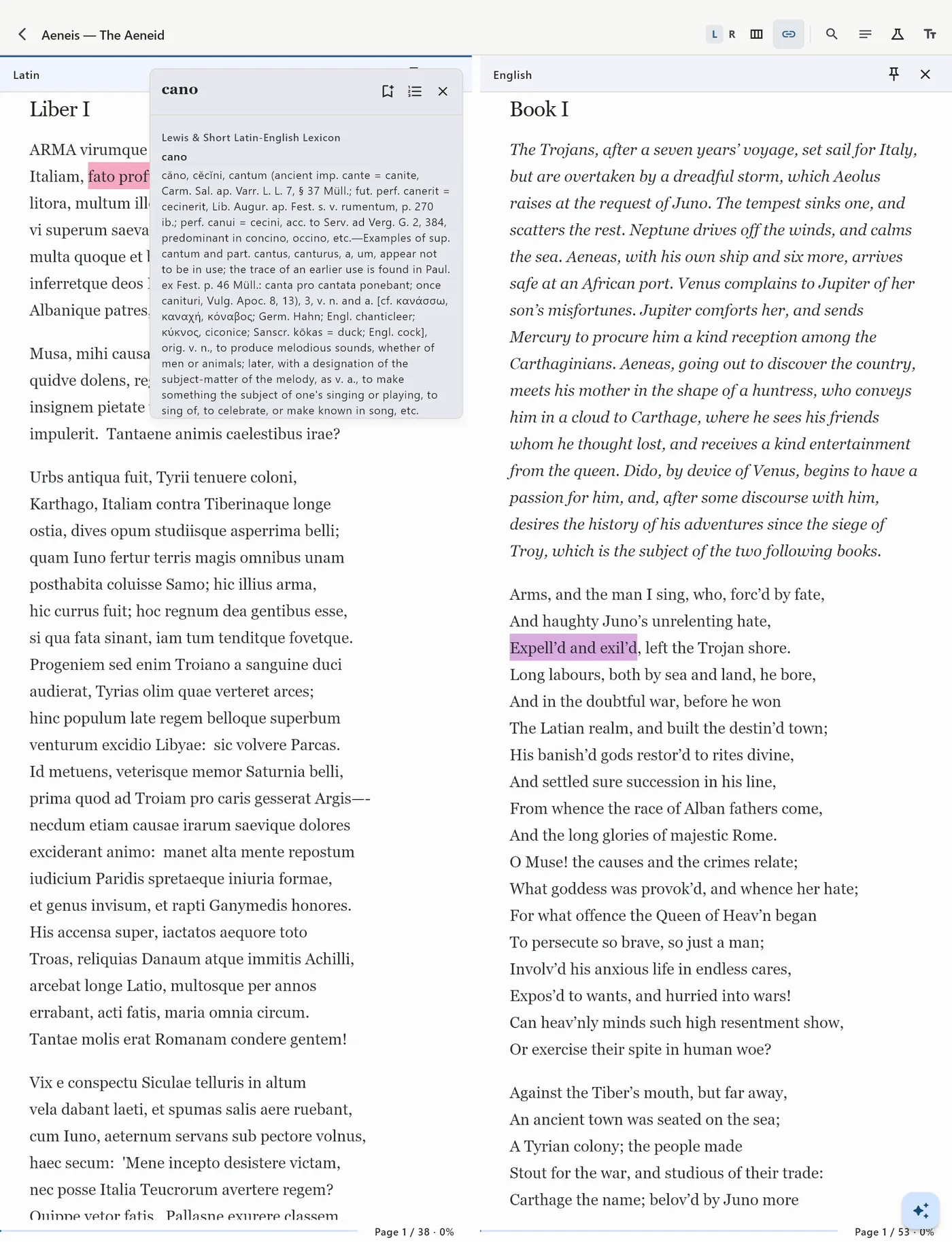
- If you want both books to move together, tap the chain icon in the toolbar to link the scrolling. Tap it again to move one book on its own.
The L and R buttons in the toolbar choose the active pane, and the toolbar’s search, notes, bookmarks and dictionary tools act on that one. On iPhone the screen is too narrow for two pages, so you switch between the two books instead.
What to put side by side
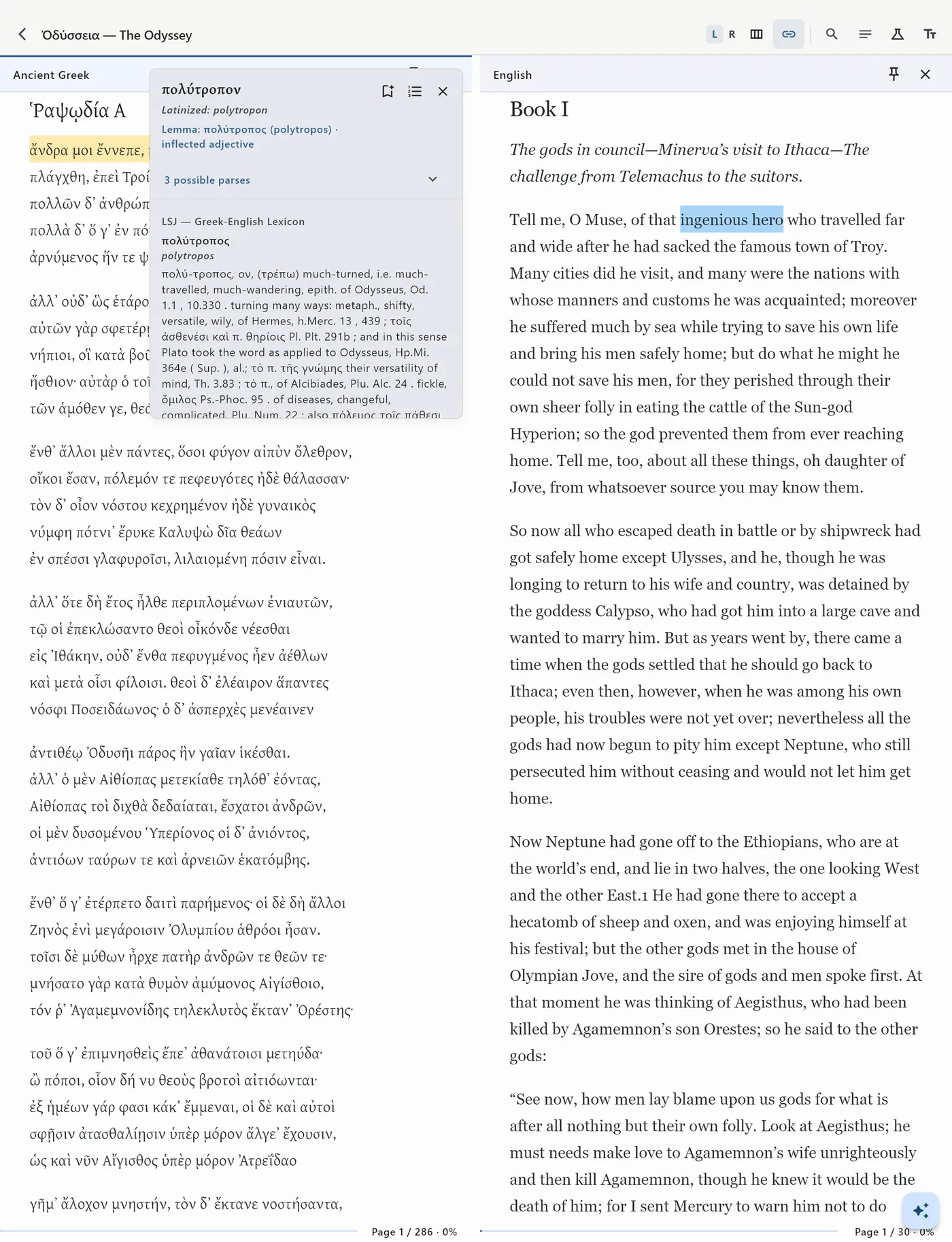
The classic pair is a book and its translation: read in the language you are learning, and look across when a sentence will not come apart, or select a word to look it up in the dictionary for that book’s language. A textbook works well beside its exercises or solutions, so the chapter stays open while you work through the problems. A paper can sit beside a source it cites, so you check the quotation in its own context instead of trusting the summary. A primary text and its commentary, or a grammar and the passage you are reading, are the same idea: one book stays where you need it while the other moves on.
What two panes add
Once both books are in one reader, they can work together in ways two separate apps cannot. You can mark a passage in one book and its counterpart in the other and keep the pair, then practice with those pairs in Recall Reading: see one side, translate it yourself, and reveal the other. Search Library looks through every book, highlight, note and saved word at once. And a word you save goes to the Word Vault with the passage it came from, and comes back later as a review card.
Questions
Can I put two PDFs side by side on iPad?
Yes. Two PDFs can go in two app windows with iPadOS multitasking, or in the two panes of Lexfolio, where each PDF keeps its own position, highlights and notes.
Does Lexfolio work with books from Kindle or Apple Books?
No. Books bought in those stores are usually protected by DRM and stay in their own apps. Lexfolio opens DRM-free EPUB and PDF files, such as public-domain books from Project Gutenberg, publishers that sell without DRM, and your own documents.
Does it work on Mac?
Yes, on Macs with Apple silicon, with the same two panes.
What does Lexfolio cost?
Every feature is open for 7 days. After that, one purchase of $9.99 unlocks it for good, with no subscription.